Electronic prescribing
For dispensers
Dispensing Software and My Script List (MySL)
Most pharmacies use third-party software to interact with digital health products including electronic prescribing. In the majority of the instances this software uses the name MySL to interface with the national product called Active Script List.
Using electronic prescribing as a dispenser
Electronic prescribing is a digital alternative to paper prescriptions. It improves safety by reducing the risk of transcription errors, and supports secure and efficient access to medicines for consumers.
Electronic prescribing is not mandatory. Consumers can choose to receive either an electronic or a paper prescription (but not both).
Once an electronic prescription is issued, the consumer receives a ‘token’ via SMS or email. Pharmacies use this token to access the electronic prescription for dispensing.
The benefits of electronic prescribing for dispensers
Benefits of electronic prescribing extend to the consumer, healthcare provider and, more broadly, the healthcare system.
- Mitigates the risk associated with lost paper prescriptions and transcription errors.
- Reduces the administrative burden for dispensers.
- Maintains consumer privacy and integrity of personal information through token encryptions and data-protection measures.
- Provides convenience and choice for consumers.
The electronic prescribing process for dispensers
If a consumer chooses to receive an electronic prescription:
- The prescriber issues the consumer with an electronic prescription token via SMS or email.
- The consumer shares the token with their pharmacy.
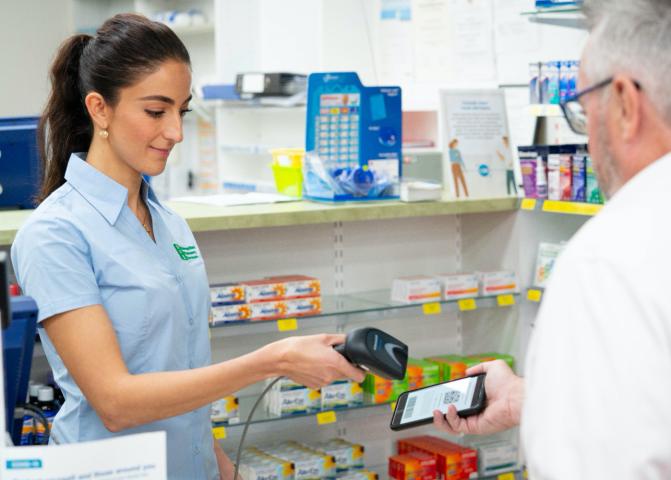
- The pharmacy scans the token to view the electronic prescription and dispense the medicine.
- If the prescription has repeats, the pharmacy confirms the consumer’s contact details are correct before sending a new token to them via SMS or email.
Consumers can choose to get their next repeat dispensed at a different pharmacy. They simply present the new token when more medicine is needed.
Safeguards are in place to prevent patients using their token at multiple pharmacies.
The token itself is not the prescription - it is evidence of a prescription. Once the token is scanned and used by a pharmacy to dispense the medicine, it is invalid and cannot be reused. The National Prescription Delivery Service will lock a prescription as soon as it is accessed so no other pharmacy can dispense it at the same time.
How to help a consumer who encounters an error when opening an electronic prescription token via SMS
Some smartphones may try to open links to electronic prescription tokens using an app rather than a mobile web browser. This action can sometimes produce an error message.
If an error message occurs, or the consumer does not want to open the link via an app, they can access the token using the following steps.
- Return to the SMS message containing the link to the token.
- IOS platform:
- Press and hold the link to bring up a menu of options.
- Select an alternative method to open the link, such as Safari or another compatible browser.
- Android platform:
- Copy and paste the link into the phone’s default browser, such as Chrome or another compatible browser.
By following these steps, the consumer should be able to access the token in their mobile browser.
What is an Active Script List?
An Active Script List (ASL) is a token management solution that contains a consolidated list of a consumer’s active prescriptions.
Instead of presenting an electronic prescription token, the consumer provides confirmation of their identity when requesting the pharmacy dispense medicines from their ASL.
Once they’ve registered for an ASL, the consumer can walk into a pharmacy of their choice, provide initial consent for that pharmacy to access their ASL, and have their medicine dispensed.
What are the benefits of ASL?
- Consumers no longer need to keep track of their SMS or email tokens. The ASL provides this information in one consolidated list.
- ASL overcomes the issue of misplaced tokens and the need for them to be reissued.
- ASL may be more convenient for consumers who take multiple medicines.
How ASL works
Initially, the consumer will need to visit their preferred pharmacy or prescriber to register for an ASL. They may need to provide 100 points of identification (PDF, 83.08 KB) in addition to accepting the terms and conditions, agreeing that all prescriptions will be sent to their ASL unless they withdraw their consent.
The consumer can also request an ASL linking code, which allows them to link their ASL to apps they use to manage their electronic prescriptions, such as 1800MEDICARE app.
After registration is complete:
- The consumer visits their prescriber, who issues an electronic prescription, which is automatically added to the ASL. The consumer does not need a token but can request to receive one.
- The consumer visits their pharmacy. Instead of presenting a token, the consumer confirms their identity.
- The pharmacy accesses the consumer’s ASL to dispense the medication.
- Any repeats are automatically added to the consumer’s ASL. The consumer can also choose to receive a token via SMS or email.
Check that you are using the most up to date version of your software with ASL functionality enabled.
Generating an Activation Code
For a consumer to view their ASL on their mobile application, like my health app, they require an Activation Code to link their ASL to the application. The Activation Code must be provided by a pharmacist. Each Activation Code is unique to the individual consumer, allowing them to use their specific code repeatedly to link their ASL to various third-party applications.
This Activation Code is available via the pharmacy’s dispensing software. Learn more about Activation Codes and how to generate one with our short educational video.
How to get the Activation Code:
- Search for the consumer within your dispensing software.
- Once verified with the consumer, open their profile and check that they are registered for an ASL. If they are not registered, proceed with the registration process.
- Once registration is verified as complete, go to the section in your software where ASL details are displayed.
- Find the option/button to generate or retrieve the Activation Code.
- Once the Activation Code is generated, provide it to the consumer so they can use it to access their ASL in third-party applications.
If you require assistance generating or retrieving the Activation Code, please contact your dispensing software helpdesk for specific instructions.
State and territory regulations
The same regulations for prescribing and supplying medicines exist for both paper and electronic prescriptions. Clinicians are required to adhere to the National Health Act 1953 and relevant state or territory regulations when prescribing and supplying medicines using an electronic prescription. This is particularly important for controlled medicines. Please contact your relevant jurisdiction for more information.
Education and Training
eLearning modules
Free CPD accredited online training can assist with providing an introduction to what an electronic prescription is, how it is prescribed and dispensed, the benefit of Active Script List, and the policy requirements and legislation that underpin the process.
Find out about:
- Electronic Prescriptions and Active Script List (MySL) in Community Pharmacy
- Active Script List (MySL) in Community Pharmacy.
Webinars
Register for a free webinar for healthcare providers to learn more about electronic prescribing in your practice, as well as other digital health topics.